Day 5: Neo4j
What is it?
Neo4j is the world’s leading graph database. Where relational databases store data in rows and columns and document databases store data as JSON-like objects, Neo4j stores data as nodes and relationships. Every entity becomes a node and every connection between entities becomes a first-class relationship with its own properties. This makes the structure of the data as queryable as the data itself.
Neo4j uses Cypher as its query language - a declarative, pattern-matching language designed specifically for graphs. A Cypher query describes the shape of the data a user is looking for and Neo4j finds all instances of that pattern in the graph. Traversing relationships in Neo4j is a native operation, not a join. This makes multi-hop queries - follow this account to its transactions, then to the devices those transactions used, then to other accounts that used the same devices - fast and natural to express.
Today, Neo4j supports native vector indexes via Cypher. Embeddings are stored as properties on nodes and vector similarity search uses the same index infrastructure as the rest of the database. This means graph traversal and vector search can be combined in a single Cypher query - no separate system, no result merging in application code.
When would you reach for it?
The clearest signal is connected data where relationships carry meaning. If the interesting questions in your domain aren’t just “what does this entity look like” but “who is this entity connected to and what does that network tell us” - graph is the right model.
The second signal is multi-hop traversal. Relational databases can express joins, but deeply nested joins across many hops are expensive and awkward to write. In Neo4j, traversing five hops across a network is as natural as traversing one.
The third signal is the combination of similarity and connectivity. Vector search tells us what things look like similar to. Graph traversal tells us what things are connected to. Fraud detection, recommendation engines, knowledge graphs and supply chain analysis all benefit from both signals simultaneously. Neo4j is one of the few database systems where we can express that combination in a single query.
The use case
For this chapter we’ll build a fraud detection system that combines vector similarity search with graph traversal. The dataset models bank accounts, transactions, devices and IP addresses. Fraudulent accounts share devices and IP addresses with each other - a pattern that reveals coordinated fraud rings.
The chapter demonstrates three distinct approaches and why each alone is insufficient:
- Pure vector search - finds transactions that look semantically similar to known fraud patterns. In our dataset, the top results of a vector search contain no fraudulent transactions, so the search alone doesn’t lead us to the fraud ring.
- Pure graph traversal - starting from a known fraudulent account, traverses the graph to find all accounts sharing devices or IP addresses. This reveals the fraud ring structure without any vector search.
- Combined graph and vector - uses vector search to find semantically suspicious transactions, then traverses the graph from each result to find connected accounts. This surfaces fraud rings that neither approach could find alone.
The data
We generate a synthetic fraud detection dataset with five node types and four relationship types.
Node types:
Account- a bank account with an account type (checking, savings, business, student) and a fraud flagTransaction- a purchase with an amount, merchant category, merchant name and a prose description; the description is what we embedDevice- a device ID used to initiate a transactionIpAddress- a network address used during a transactionMerchant- a fictional merchant name
Relationship types:
(:Account)-[:MADE]->(:Transaction)(:Transaction)-[:USED_DEVICE]->(:Device)(:Transaction)-[:FROM_IP]->(:IpAddress)(:Transaction)-[:AT_MERCHANT]->(:Merchant)
The fraud rate is controlled by FRAUD_RATE = 0.05, so approximately 5% of accounts are designated as fraudulent. The count is rounded down, so with 50 accounts we get 2 fraudulent accounts (4%). Fraudulent accounts are assigned shared fraud devices (DEV_FRAUD_*) and shared IP addresses, which about 70% of their transactions use. Legitimate transactions draw devices and IP addresses at random from larger pools, so some legitimate accounts share a device or IP address by chance. This creates a detectable fraud ring in the graph that graph traversal can surface, along with some noise.
The dataset scales via NUM_ACCOUNTS and NUM_TRANSACTIONS, and the number of fraudulent accounts follows FRAUD_RATE. Only the fraudulent accounts’ transactions can be fraudulent, so the share of fraudulent transactions is lower still (3 of 200 in our run).
Building the application
Prerequisites
To follow along you’ll need:
- A Neo4j AuraDB account
- Ollama running locally with the
all-minilmmodel pulled - Python 3.12 with a virtual environment
Create a free Neo4j AuraDB instance
If you don’t already have an instance:
- Go to Neo4j Console and create an account
- Click Create free instance
- Download or copy the generated admin credentials
Configuration
We’ll set the following environment variables before running the notebook:
export NEO4J_URI="neo4j+s://xxxxxxxx.databases.neo4j.io"
export NEO4J_USERNAME="xxxxxxxx"
export NEO4J_PASSWORD="your-password"
export NEO4J_DATABASE="xxxxxxxx"
Then in the notebook:
NEO4J_URI        = os.environ["NEO4J_URI"]
NEO4J_USERNAME   = os.environ["NEO4J_USERNAME"]
NEO4J_PASSWORD   = os.environ["NEO4J_PASSWORD"]
NEO4J_DATABASE   = os.environ["NEO4J_DATABASE"]
LLM_EMBEDDING    = "all-minilm"
NUM_ACCOUNTS     = 50
NUM_TRANSACTIONS = 200
FRAUD_RATE       = 0.05
RANDOM_SEED      = 42
Note:
NUM_TRANSACTIONScontrols the size of the generated dataset. 200 is the recommended default for this chapter - embedding generation runs locally via Ollama and is single-threaded, so larger values will work but will take proportionally longer. Production pipelines would typically use a hosted embedding endpoint with async or batched generation to handle scale.
Determine embedding dimensions
We’ll determine the embedding dimensions dynamically from a test embedding:
def get_embedding(text: str) -> list:
    response = ollama.embeddings(model = LLM_EMBEDDING, prompt = text)
    return response["embedding"]

test_embedding = get_embedding("suspicious transaction at an electronics merchant")
EMBEDDING_DIMS = len(test_embedding)
print(f"Embedding dimensions: {EMBEDDING_DIMS}")
Connect to Neo4j AuraDB
We’ll suppress deprecation notices in the driver configuration to keep the output clean. Newer Neo4j releases deprecate the db.index.vector.queryNodes() procedure in favor of the Cypher SEARCH clause. The procedure still works, so we’ll use it here and suppress the notice:
driver = GraphDatabase.driver(
    NEO4J_URI,
    auth = (NEO4J_USERNAME, NEO4J_PASSWORD),
    notifications_disabled_categories = {NotificationDisabledCategory.DEPRECATION}
)

driver.verify_connectivity()
print("Connected to Neo4j AuraDB.")
Generate the dataset
We generate accounts, transactions, devices and IP addresses programmatically. The fraud ring is planted by assigning a pool of shared devices and IP addresses to the fraudulent accounts:
num_fraud_accounts = max(1, int(NUM_ACCOUNTS * FRAUD_RATE))
fraud_account_ids  = set(random.sample(range(NUM_ACCOUNTS), num_fraud_accounts))

# Shared fraud infrastructure
fraud_devices = [f"DEV_FRAUD_{i:03d}" for i in range(3)]
fraud_ips     = [f"192.168.{random.randint(10,99)}.{random.randint(1,254)}" for _ in range(3)]

# Legitimate devices and IPs - drawn at random, so some are shared by chance
legit_devices = [f"DEV_LEGIT_{i:03d}" for i in range(NUM_ACCOUNTS * 2)]
legit_ips = [f"10.{random.randint(0,255)}.{random.randint(0,255)}.{random.randint(1,254)}"
                 for _ in range(NUM_ACCOUNTS * 2)]
Fraudulent transactions get higher amounts and descriptions drawn from fraud-flavored templates. Legitimate transactions get lower amounts and standard templates. The descriptions are what we embed:
FRAUD_TEMPLATES = [
    "Unusual purchase of ${amount} at {merchant} ({category}) from an unrecognized {device_type} device.",
    "High-value {category} transaction of ${amount} at {merchant} from a new {device_type} device.",
    # ... further templates
]
Load the graph
We clear the database before each run, create uniqueness constraints on all node types, then load accounts, transactions and relationships in separate steps. The clear step drops every constraint and every index except the built-in lookup indexes, then deletes all nodes and relationships in batches of 1,000:
def clear_database(session):
    # Drop all constraints
    constraints = session.run("SHOW CONSTRAINTS YIELD name RETURN name").data()
    for c in constraints:
        session.run(f"DROP CONSTRAINT {c['name']} IF EXISTS")

    # Drop all non-lookup indexes
    indexes = session.run("""
        SHOW INDEXES YIELD name, type
        WHERE type <> 'LOOKUP'
        RETURN name
    """).data()
    for idx in indexes:
        session.run(f"DROP INDEX {idx['name']} IF EXISTS")

    # Delete all nodes and relationships in batches
    while True:
        result = session.run("""
            MATCH (n) WITH n LIMIT 1000
            DETACH DELETE n
            RETURN count(*) AS deleted
        """)
        if result.single()["deleted"] == 0:
            break

    print("Database cleared -- constraints, indexes and data removed.")
Note: This removes everything in the database, not just this chapter’s data, so only run it against an instance you’re happy to wipe.
The embedding is generated for each transaction description and stored as a property on the Transaction node:
with driver.session(database = NEO4J_DATABASE) as session:
    for txn in tqdm(transactions, desc = "Loading transactions"):
        embedding = get_embedding(txn["description"])
        session.run("""
            MATCH (a:Account {account_id: $account_id})
            MERGE (t:Transaction {transaction_id: $transaction_id})
            SET t.amount = $amount,
                t.category = $category,
                t.merchant = $merchant,
                t.is_fraud = $is_fraud,
                t.description = $description,
                t.embedding = $embedding
            MERGE (a)-[:MADE]->(t)
            MERGE (d:Device {device_id: $device_id})
            MERGE (t)-[:USED_DEVICE]->(d)
            MERGE (i:IpAddress {ip_address: $ip_address})
            MERGE (t)-[:FROM_IP]->(i)
            MERGE (m:Merchant {name: $merchant})
            MERGE (t)-[:AT_MERCHANT]->(m)
        """, ...)
The MERGE keyword ensures that shared devices and IP addresses are created once and reused across transactions, which is what builds the fraud ring structure in the graph.
Create the vector index
Neo4j supports native vector indexes via Cypher. We’ll use EMBEDDING_DIMS to keep the index definition in sync with the embedding model:
session.run(f"""
    CREATE VECTOR INDEX transaction_embeddings
    FOR (t:Transaction) ON (t.embedding)
    OPTIONS {{indexConfig: {{
        `vector.dimensions`: {EMBEDDING_DIMS},
        `vector.similarity_function`: 'cosine'
    }}}}
""")
We’ll then poll until the index state is ONLINE before running queries:
print("Waiting for vector index to be online...")

while True:
    with driver.session(database = NEO4J_DATABASE) as session:
        result = session.run("""
            SHOW INDEXES
            WHERE name = 'transaction_embeddings'
        """)
        record = result.single()
        state  = record["state"] if record else "NOT FOUND"
        if state == "ONLINE":
            print("Vector index is online.")
            break
        print(f"  State: {state} - waiting...")
        time.sleep(3)
Vector search - find similar transactions
Pure vector search uses db.index.vector.queryNodes() to find transactions semantically similar to the query. The result is joined back to the Account node via the MADE relationship in the same Cypher query:
CALL db.index.vector.queryNodes(
    'transaction_embeddings', $top_k, $embedding
) YIELD node AS t, score
MATCH (a:Account)-[:MADE]->(t)
RETURN t.transaction_id AS transaction_id,
       a.account_id AS account_id,
       t.amount AS amount,
       t.category AS category,
       t.merchant AS merchant,
       t.is_fraud AS is_fraud,
       t.description AS description,
       score
ORDER BY score DESC
Running this against our dataset reveals a key limitation (the top two of five results are shown):
Vector search: 'suspicious high-value purchase at an electronics merchant from an unrecognized device'

  TXN00156 | ACC0028 | $339.80 | electronics | [OK]
  Score: 0.780 | Transaction of $339.80 processed at PixelMart (electronics) from a tablet.

  TXN00115 | ACC0032 | $397.58 | online retail | [OK]
  Score: 0.779 | Purchase of $397.58 at BuyEasy, a online retail merchant, using a mobile device.
All five results are legitimate transactions, and only 3 of the 200 transactions are fraudulent. The closest matches are ordinary purchases that share surface-level wording with the query, such as “electronics” and “device”. This illustrates a limitation of vector search for fraud detection: fraudulent behavior doesn’t always look semantically different from legitimate behavior, so similarity alone may not surface it.
Graph traversal - find connected accounts
Starting from a known fraudulent account, we traverse the graph two hops to find all accounts sharing devices or IP addresses. This is pure Cypher, with no vector search involved:
MATCH (a:Account {account_id: $account_id})-[:MADE]->(t:Transaction)
MATCH (t)-[:USED_DEVICE|FROM_IP]->(shared)<-[:USED_DEVICE|FROM_IP]-(t2:Transaction)
MATCH (a2:Account)-[:MADE]->(t2)
WHERE a2.account_id <> $account_id
RETURN DISTINCT
    a2.account_id AS connected_account,
    a2.account_type AS account_type,
    a2.is_fraud AS is_fraud,
    labels(shared)[0] AS shared_via,
    CASE labels(shared)[0]
        WHEN 'Device' THEN shared.device_id
        WHEN 'IpAddress' THEN shared.ip_address
    END AS shared_value
ORDER BY a2.is_fraud DESC
Starting from ACC0007 (the first two of six rows are shown):
Accounts connected to ACC0007 via shared devices or IP addresses:

  ACC0040 (business) [FRAUD]
  Shared via Device: DEV_FRAUD_002

  ACC0006 (checking) [OK]
  Shared via Device: DEV_LEGIT_071
ACC0040 is immediately surfaced as a connected fraudulent account via DEV_FRAUD_002. Graph traversal finds the fraud ring in two hops without any embedding or similarity computation. The other four rows are legitimate accounts that happen to share a device or IP address with ACC0007, such as ACC0006 via DEV_LEGIT_071. Shared infrastructure is a signal, not proof, and it produces false positives that an investigator would need to review.
Combined graph and vector search
The most powerful query combines both approaches in a single Cypher statement. Vector search finds semantically suspicious transactions; graph traversal then finds connected accounts from each result:
// Step 1: find similar transactions via vector search
CALL db.index.vector.queryNodes(
    'transaction_embeddings', $top_k, $embedding
) YIELD node AS t, score
WHERE score >= $threshold

// Step 2: traverse the graph to find connected accounts
MATCH (a:Account)-[:MADE]->(t)
MATCH (t)-[:USED_DEVICE|FROM_IP]->(shared)<-[:USED_DEVICE|FROM_IP]-(t2:Transaction)
MATCH (a2:Account)-[:MADE]->(t2)

// Step 3: return the network
RETURN DISTINCT
    t.transaction_id AS similar_transaction,
    score AS similarity,
    a.account_id AS flagged_account,
    a.is_fraud AS flagged_is_fraud,
    a2.account_id AS connected_account,
    a2.is_fraud AS connected_is_fraud,
    labels(shared)[0] AS shared_via
ORDER BY score DESC, a2.is_fraud DESC
This query reaches accounts that vector search alone doesn’t surface. Starting from a semantically similar transaction, it traverses to accounts connected via shared infrastructure, which can include fraudulent accounts. In the output, the “flagged account” is simply the owner of the similar transaction. We call it with top_k = 10 and a similarity threshold of 0.7:
graph_vector_search(
    "suspicious high-value purchase from an unrecognized device",
    top_k = 10,
    similarity_threshold = 0.7
)
The call prints a summary line (35 rows, 2 involving a fraudulent account) and the first 10 rows, with rows that involve a fraudulent account listed first. Most rows connect only legitimate accounts. Two rows matter (shown here):
  Similar transaction: TXN00087 | Score: 0.771
  Flagged account:     ACC0042 [OK]
  Connected account:   ACC0040 [FRAUD] (via IpAddress)

  Similar transaction: TXN00169 | Score: 0.745
  Flagged account:     ACC0015 [OK]
  Connected account:   ACC0007 [FRAUD] (via IpAddress)
None of the similar transactions belongs to a fraudulent account, so vector search alone surfaced neither ACC0040 nor ACC0007. Traversing the graph from two legitimate-looking hits reached both of them.
A different query with a lower threshold ("unusual out-of-pattern transaction from unfamiliar device" with similarity_threshold = 0.65) returns 28 rows, again 2 of them involving a fraudulent account. One of them connects both fraud ring accounts directly:
  Similar transaction: TXN00141 | Score: 0.724
  Flagged account:     ACC0040 [FRAUD]
  Connected account:   ACC0007 [FRAUD] (via Device)
The two fraudulent accounts surface together through their shared device - exactly the fraud ring the graph was designed to contain. The other rows are noise, which is why the production notes below recommend filtering the output.
Fraud ring visualization
A network visualization makes the fraud ring structure immediately obvious. We use networkx for graph layout and plotly for interactive rendering.
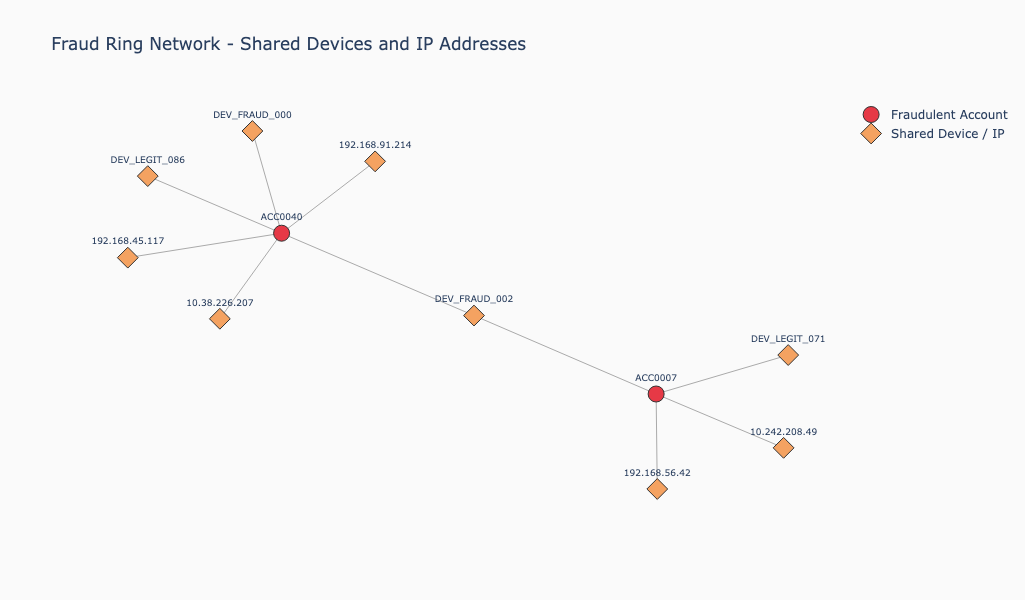
Figure 5-1. Fraud Ring Network Plot.
The fraud ring network plot in Figure 5-1 shows:
- Red circles for fraudulent accounts (
ACC0007,ACC0040) - Orange diamonds for the devices and IP addresses used by the fraudulent accounts
DEV_FRAUD_002appears as the central orange diamond connecting the two red nodes - the smoking gun device
The key insight from the visualization is the two-cluster structure. ACC0007 and ACC0040 each have their own satellite devices and IP addresses, but DEV_FRAUD_002 bridges the two clusters. This shared bridge is what a fraud investigator would focus on first.
The device sharing bar chart, shown in Figure 5-2, reinforces this with aggregated data. DEV_FRAUD_002 stands out as a pure red bar - two accounts sharing it, both fraudulent. DEV_LEGIT_071 and DEV_LEGIT_086 show mixed signal with one fraudulent account each - realistic noise that a production system would need to investigate further. All other shared devices are exclusively legitimate.
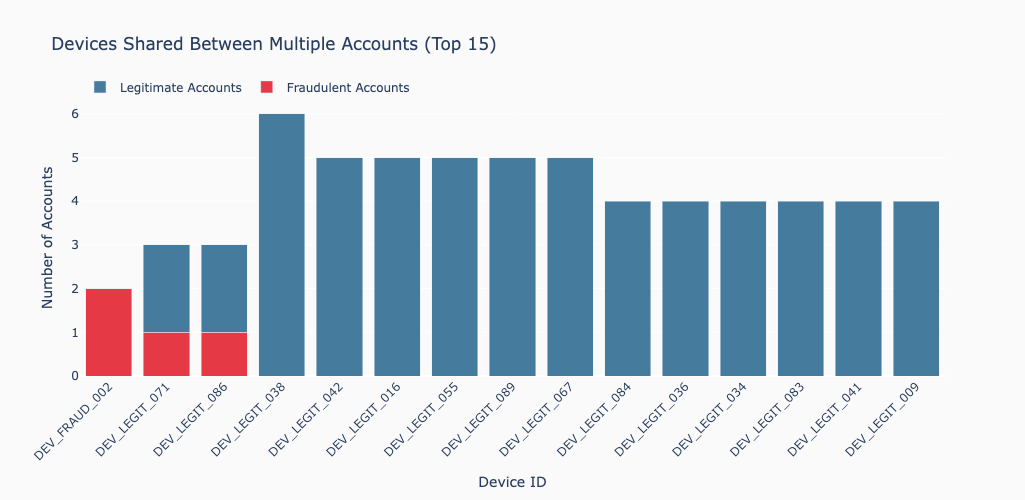
Figure 5-2. Device Sharing.
Fraud ring summary
A final Cypher query aggregates the device sharing pattern across the full dataset:
MATCH (a:Account)-[:MADE]->(t:Transaction)-[:USED_DEVICE]->(d:Device)
WITH d, collect(DISTINCT a) AS accounts
WHERE size(accounts) > 1
RETURN d.device_id AS device_id,
       size(accounts) AS num_accounts,
       size([a IN accounts WHERE a.is_fraud = true]) AS fraud_accounts
ORDER BY fraud_accounts DESC, num_accounts DESC
The notebook prints the first 10 of the 55 devices that more than one account shares (the first two are shown here):
Devices shared between multiple accounts (55 in total, showing the first 10):

  Device: DEV_FRAUD_002
  Accounts: 2 total, 2 fraudulent

  Device: DEV_LEGIT_071
  Accounts: 3 total, 1 fraudulent
DEV_FRAUD_002 rises to the top of the list with 100% fraud rate - a clear signal that any account sharing this device warrants immediate investigation.
What you’d hit in production
Vector search syntax. Newer Neo4j releases deprecate db.index.vector.queryNodes() in favor of the Cypher SEARCH clause. The procedure used in this chapter works correctly, and any deprecation notice can be suppressed via NotificationDisabledCategory.DEPRECATION in the driver configuration. Check the release notes for the version you’re running and plan to move new code to the SEARCH clause.
Loading speed. Inserting each transaction as a separate session call is simple but slow for large datasets. For production bulk loads use UNWIND with batched parameters to insert many nodes and relationships in a single query.
Index creation timing. The vector index must be fully ONLINE before queries will return results. The polling loop using SHOW INDEXES WHERE name = 'index_name' is the reliable way to wait for this - don’t assume the index is ready immediately after the CREATE VECTOR INDEX statement returns.
Combined query result volume. The combined graph and vector search can return a large number of rows when the similarity threshold is low and the graph is densely connected. In production, filter the output to return only connections involving at least one flagged account and consider adding a minimum fraud score threshold to reduce noise.
AuraDB Free tier limits. The free tier has limits on the number of nodes and relationships, on storage and on instances, so check the current limits in the Aura documentation. The dataset in this chapter is well within them. Production fraud detection datasets with millions of transactions and accounts require a paid AuraDB tier or a self-hosted Neo4j Enterprise deployment.
Self-hosted Neo4j. Neo4j can be run locally via Docker or deployed on your own infrastructure. The self-hosted version supports the Graph Data Science (GDS) library, which adds community detection, centrality algorithms and path finding that significantly extend fraud detection capabilities beyond what pure Cypher can express.
When to look elsewhere
Neo4j is the right choice when relationships are central to your problem. Consider alternatives if:
- Your data are not highly connected. If your use case is primarily about finding similar items without traversing networks of entities, a simpler vector database from earlier chapters will serve you better with less operational overhead.
- You need pure vector search at very large scale. Neo4j’s vector index is capable, but purpose-built vector databases are optimized specifically for high-throughput similarity search at hundreds of millions of vectors.
- Your team has no graph database experience. The Cypher query language is learnable, but the graph data modeling mindset - thinking in nodes and relationships rather than tables or documents - requires an adjustment. Factor in the learning curve.
- You need GDS algorithms on a managed cloud service. The AuraDB free tier does not include the Graph Data Science library. If community detection, PageRank or shortest path algorithms are central to your use case, you need either a paid AuraDB tier or a self-hosted deployment.
For problems where the connections between entities are the signal - fraud rings, recommendation networks, knowledge graphs, supply chain analysis - Neo4j offers something the other databases in this book don’t: the ability to combine semantic similarity and graph traversal in a single native query, against a database that was built from the ground up to store and traverse relationships efficiently.